“I love to soar in the boundless sky. In the vast emptiness of the blue, my soul rejoices listening to the soundless music of the wind.”
― Banani Ray, The Voice of a Mountain Bird

“I love to soar in the boundless sky. In the vast emptiness of the blue, my soul rejoices listening to the soundless music of the wind.”
― Banani Ray, The Voice of a Mountain Bird
I’m sort of a detail-obsessed guy and some photographs like this are only for enjoying the randomness and the little details in them. If we look at a leaf branching out, there’re these nuances of art and perfection in them. We see the function designed into them here. It’s not random or accidental, but we see purpose and intention in them. As Ralph Waldo Emerson famously put it, “Every particular in nature, a leaf, a drop, a crystal, a moment of time is related to the whole, and partakes of the perfection of the whole.”
(The photo is captured from a cafe in Istanbul, circa 2014)
Wanted a smile that melts you down right now?
This sweet little angel appeared when I was on a bus while on a visit to Istanbul in 2014 and this little one kept smiling at me. Subtleties and details such as me being in that bus seat at the right moment of time and for this cute one to be exactly there to smile back and to capture that exact little moment! I believe in Almighty’s magical way of delighting us with details unconceivable. Everything happening in our life has a reason and a purpose, regardless of whether we can envisage it or not. Let’s be somebody’s reason to smile 🙂 | God bless.
“Drink your tea slowly and reverently, as if it is the axis on which the world earth revolves – slowly, evenly, without rushing toward the future.”
― Thich Nhat Hanh
Last week, I was able to experience drone flights with Afeef. I’m really fond of aerial photography and we were talking of the different visual perspectives that we can craft when a drone is used, unlike a traditional camera where either the subject or the camera has to move to compose the scene that we intend to shoot. Wondering at the boundless possibilities offered by aerial photography. His drone is Mavic Mini by DJI. Unlike other heavy-duty drones which are pretty heavy, Mavic Mini is known for its low footprint and unit compactness. I had seen some reviews of extra flight packs that are augmented with additional battery packs and other accessories. While we enjoy using them, we need to exert best efforts to assure that we respect the civil aviation authority guidelines and rules on operating aerial vehicles in the particular geography that we operate in. Different countries have different guidelines and instructions on flying these marvels and these are to be respected. We talked about a recent footage which he had posted.
In an earlier post, I had explained on how to use QR presets on Snapseed. I’m planning to share some of the presets that I’ve made over the past few years. The first one in this series would be Warmia.

Google’s Snapseed ( iPhone | Android ) is unarguably one of the most popular mobile photo editors available for free and is known for its ease of use, simplicity and the array of professional image editing features packed into it. It also has the ability to do a lot of effects and adjustments on top of each other and this sequence or stack of edits can be labeled or archived so that you can use the same sequence or package of edits across several images. This allows you to save a set of edits matching your style and liking. A lot of you might be aware of this app and might be using it regularly. But I’m now sharing a powerful feature of this app that allows you to prepare presets/filters and share it with others. You can also use presets/filters prepared by others. In some other professional editing programs like Lightroom, these presets are files which you’d have to download and use it in the program window. The process remains the same for other major image editing programs as well as of today. Snapseed has gone a step further and has come up with an intuitive way to use and share presets. They do it through QR codes. I’ll explain it in 4 easy steps
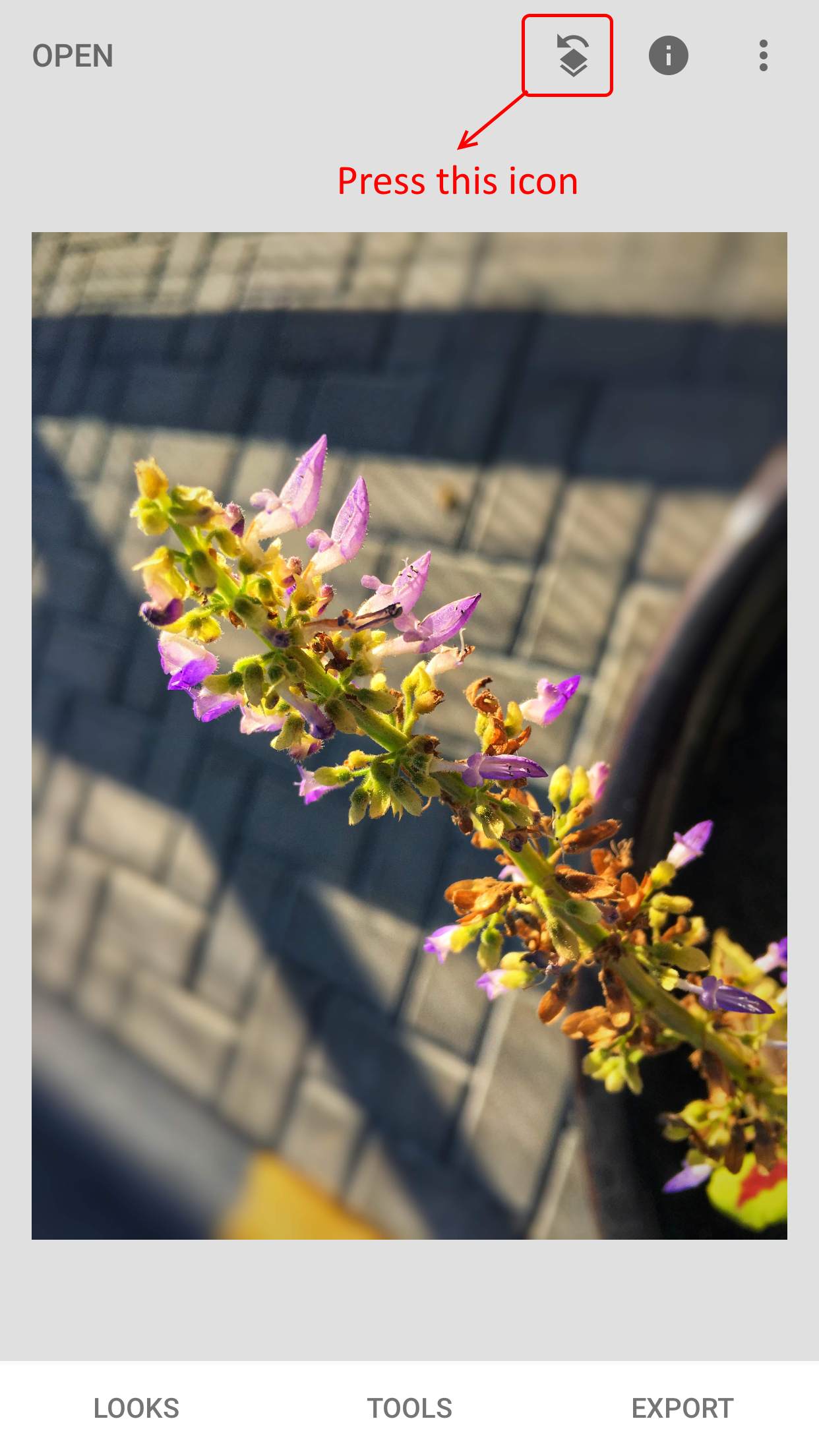
Step 1 – Open any image on Snapseed mobile app.
After opening the image, press the icon as shown below.
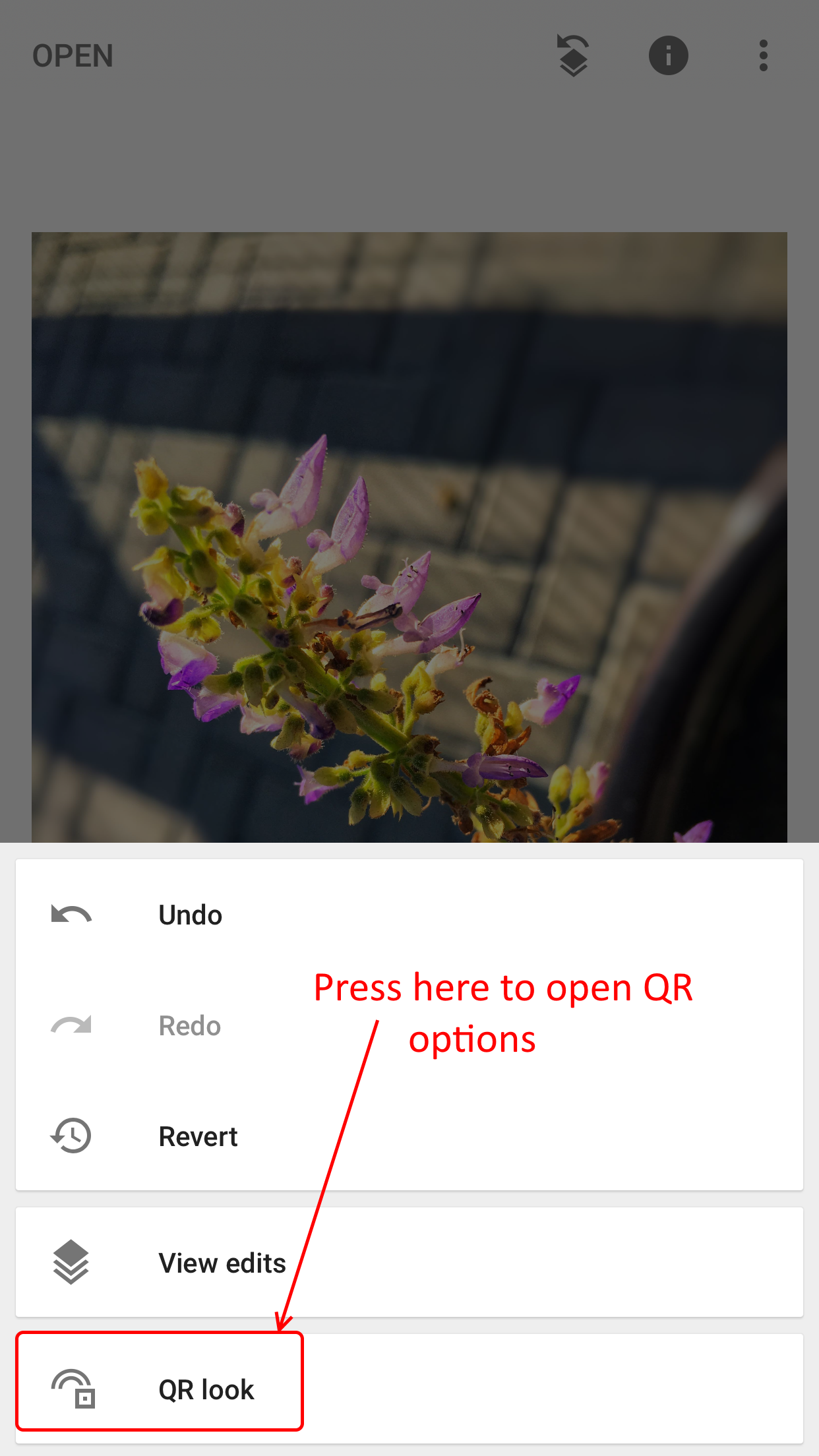
Step 2 – In the submenu that appears, click on QR Look.
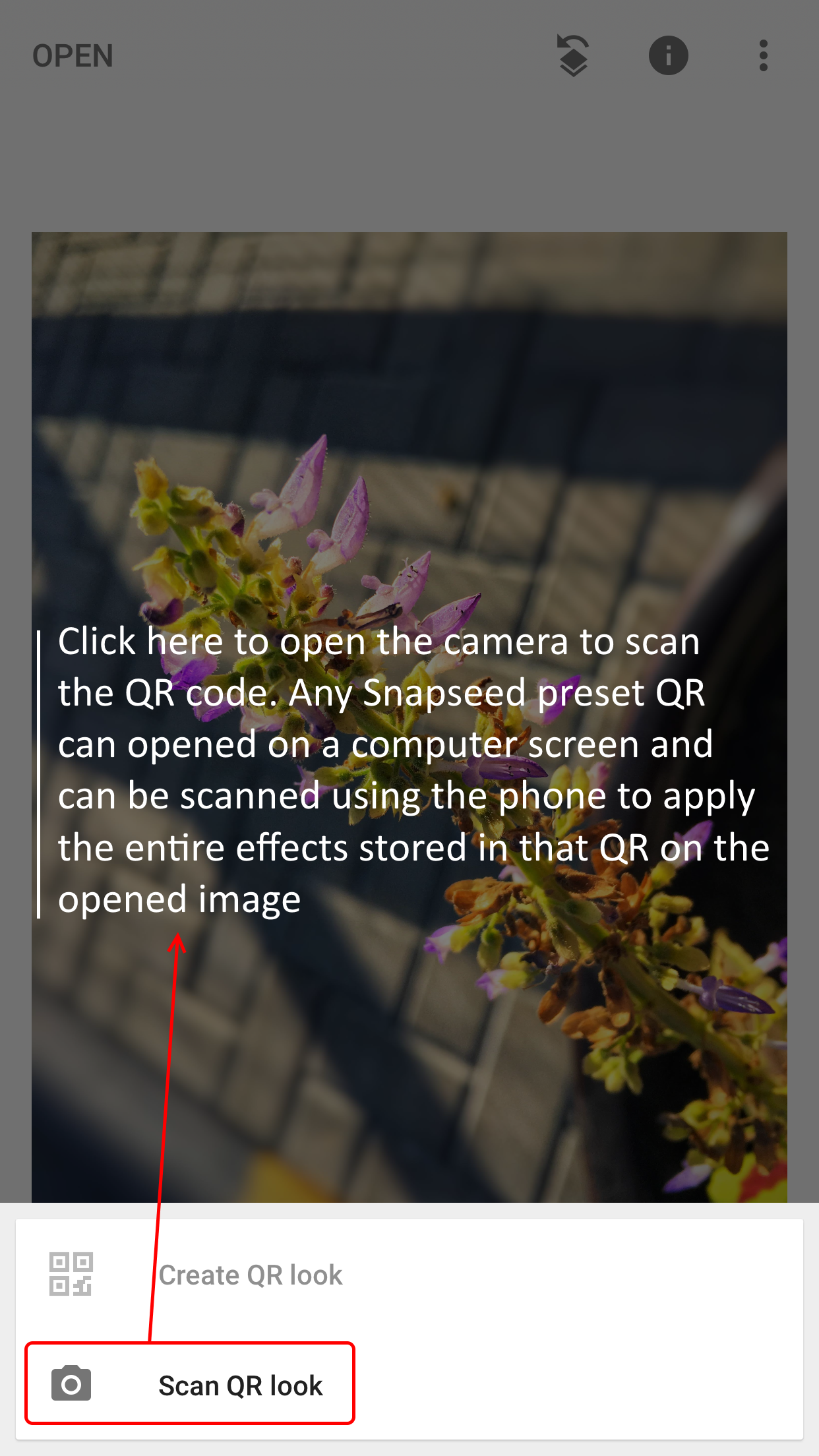
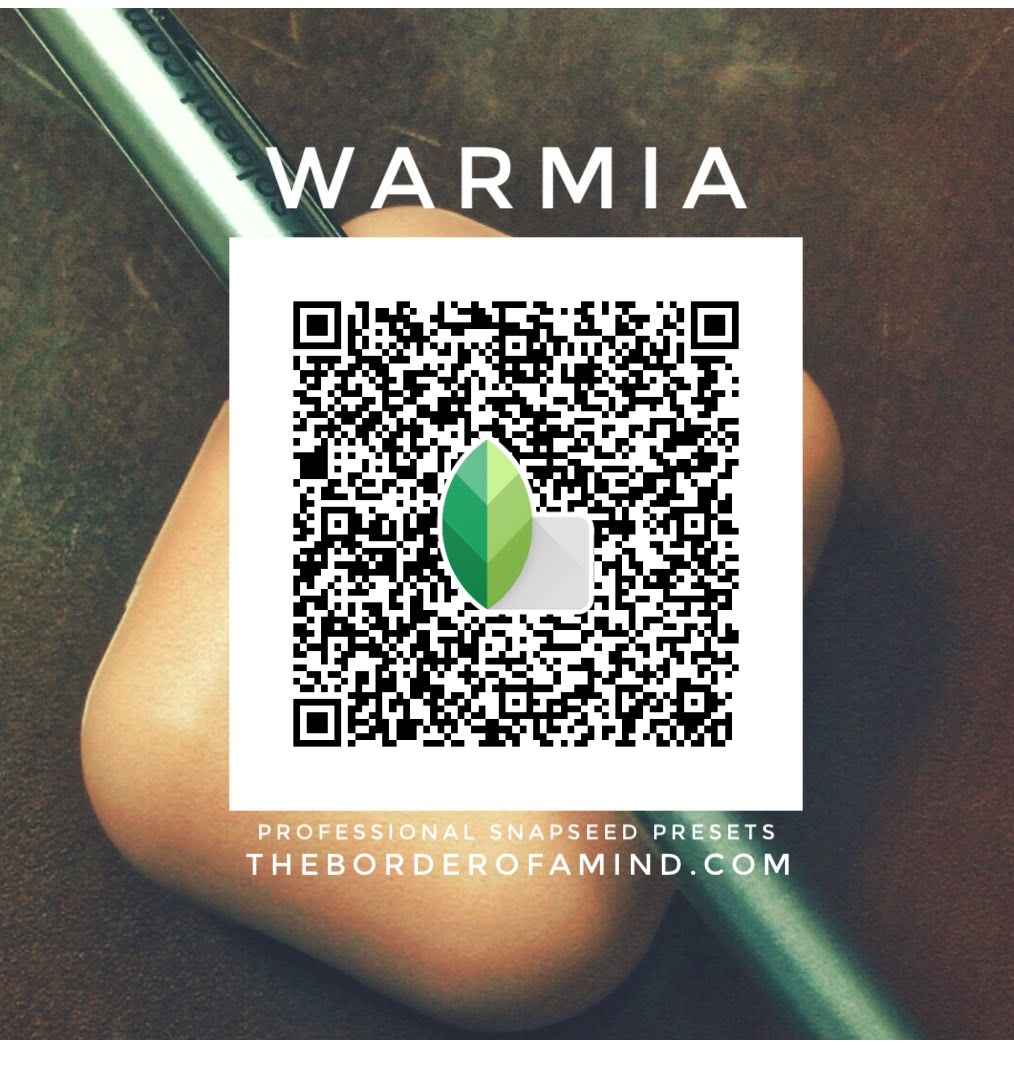
Step 3 – Press on Scan QR look. This would open the camera and you’ve to scan the QR code of a preset or effect. As an example, below is a sample preset that I had created called Warmia. As a demo, you can try to scan this QR code and a set of effects would be performed on the image.
For instance, below is a preset “Warmia” that I created as a demo. In Step 3, when you’re asked for a QR code, the below QR code could be scanned. You can also create your own effects by choosing Create QR Look in Step 3 shown above.
Step 4 – There is not Step 4. Sit back as your image is being professionally enhanced : )
Over the past couple of years, I’ve created several Snapseed filters for my personal use. As a series, I’m thinking of introducing these presets with my community in several chapters. In each episode of these series, I shall try to share some of the filters and presets that I’ve spent a lot of loved time curating and tuning in with hundreds of images. Stay tuned for those to come in. Let me know your feedback.
Explore Snapseed filter packs from The Border of a Mind:
Warmia – a color palette suitable for objects shot in close range in an indoor setting.
Don’t force anything. What flows will flow. What’s meant for you will be for you.
Above photograph captured by Netta from Pondicherry beach, 2017.
Red mermaid Netta in the above one, Pondicherry, circa 2017.
“Although I deeply love oceans, deserts, and other wild landscapes, it is only mountains that beckon me with that sort of painful magnetic pull to walk deeper and deeper into their beauty. They keep me continuously wanting to know more, feel more, see more.”
― Victoria Erickson
My colleague’s photograph that I captured when he was capturing the mountains, circa 2018 somewhere in Fujairah, an emirate of the UAE.
A photograph of my father glancing at some kites on a clear sky, Quilon beach, circa 2014
Explore our photography themes.